OVERVIEW
● This blog discusses how anyone can achieve voice-to-text translation online in minutes, whether a student, professional, call center, creator, or an international team, by using the right tool and optimized methodologies.
● You will learn how online voice translators work, what influences accuracy, how to prepare your audio, how to choose the right platform, and the exact workflow utilized by professionals to achieve fast, accurate, multilingual transcripts.
Introduction
Today, communication moves quicker than fingers can type. Meetings switch languages mid-sentence, customers speak to you in mixed dialects, creators record on-the-move, and global teams share audio notes instead of lengthy emails. No modern work waits for manual transcription, let alone someone who can translate everything by hand.
This is exactly where online voice-to-text translation has become a breakthrough.
Not a trend.
Not a fancy feature.
A real productivity multiplier.
The shift is simple:
Instead of typing, re-typing, or forwarding recordings to someone else… people want instant, accurate, multilingual text from any audio file or live speech.
And the good news is, it’s absolutely possible.
But here’s the insight that most articles skip:
The quality of your translated transcript doesn’t depend just on the tool but also on how you prepare your audio, what language models you choose, and what workflow you follow.
This blog breaks down exactly how to Translate Voice to Text Online in minutes, keeping the accuracy high, even for complex accents, multi-speaker conversations, or low-quality audio.
This is your guide to doing it right.
Why Translating Voice to Text Online Matters in 2025?
● Across India, APAC, UAE, and Europe, remote teams are working together more than ever.
● Multilingual conversations have become a norm in CX, sales, support, and field operations.
● Video content dominates, and creators need captions + translations
● Businesses need searchable, multilingual documentation
● People prefer quick audio notes rather than long texts.
Stat: 64% of global teams use voice messaging weekly for work. (Source: Slack Future of Work Pulse, 2024).
Stat: AI-powered transcription and translation tools cut documentation time by up to 72%. (Gartner Digital Workflow Report, 2024).
How Online Voice Translation Actually Works?
At a technical level, every online voice translator follows a three-layer process:
1. ASR – Automatic Speech Recognition
Detects speech → Converts sound waves into text
2. NMT – Neural Machine Translation
Converts that text from Language A → Language B
3. NLP Formatting Layer
Adds punctuation, corrects grammar, and detects context
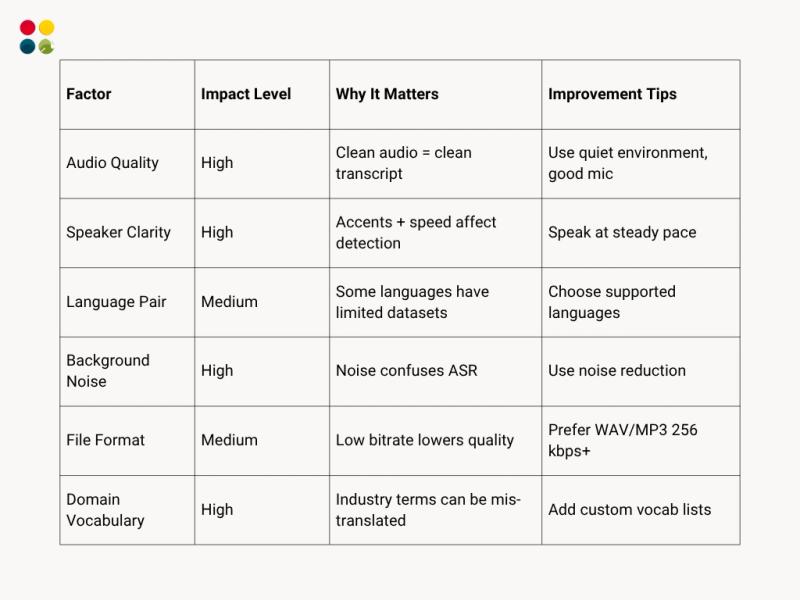
The accuracy depends on:
● Audio clarity
● Language support
● Speaker clarity and pace
● Noise levels
● Accent adaptability
● Vocabulary familiarity
Step-by-Step: How to Translate Voice to Text Online in Minutes
This is the expert workflow professionals follow:
Step 1: Prepare Your Audio for Best Accuracy
Before uploading:
✔ Record in a quiet room
✔ Use 48 kHz sample rate
✔ Prefer WAV or high-quality MP3
✔ Avoid speaking too fast
✔ Keep the mic at a 15–25 cm distance
✔ Ensure only one person speaks at a time
✔ Remove irrelevant noise-heavy segments
Stat: Clean audio improves translation accuracy by 40–50%. (Stanford NLP Study, 2023).
Step 2: Select a Reliable Voice Translator Free or Paid
A professional-grade system should include:
● Multi-language support
● Accent detection
● Real-time translation
● Auto punctuation
● Noise cancellation
● Domain vocabulary support
● Multi-speaker recognition
● File upload + live mic input
Voice Translator Free tools work for basic tasks.
But if you need accuracy, speed, or confidentiality, professional tools outperform dramatically.
Step 3: Upload Your File or Start Speaking Live
Most online converters allow:
✔ Uploading audio files (MP3, WAV, M4A, OGG)
✔ Speaking directly via microphone
✔ Pasting meeting links or call recordings
Step 4: Choose the Source & Target Languages
Examples:
● Hindi → English
● English → Tamil
● Marathi → English
● Arabic → English
● Bengali → Hindi
Pro Tip: Use “auto-detect” only when needed. Accuracy improves when the source language is fixed.
Step 5: Translate Voice to Text Online
This tool processes your audio and produces:
● Voice to Text Online transcription
● Language translation
● Grammar-corrected output
● Speaker-separated text (if supported)
Time required?
Usually, 1 to 3 minutes for a 10-minute recording.
Step 6: Download or Export Your Text
Your translated transcript can be exported as:
● TXT
● DOCX
● SRT (for subtitles)
● CSV
● Email / WhatsApp shareable links
What Affects Voice-to-Text Translation Accuracy?
Advanced Techniques for Perfect Output
1. Use dual-channel audio for multi-speaker calls
AI identifies speakers separately.
2. Add vocabulary training for business terms
Especially for FMCG, BFSI, healthcare, logistics, and tech support.
3. Use time-stamps for meetings
Makes referencing faster.
4. Auto-translate into multiple languages
Many tools allow 1 input → 5 language outputs.
Thoughts to Ponder
● How much time do you or your team spend manually typing?
● Are language barriers slowing down your customer support or sales team?
● How much multilingual content would you be able to create if Voice to Text Free were easy?
● What insights are hidden in your voice notes, meetings, calls, and recordings?
Voice is the new writing.
Translation is the new productivity skill.
Key Takeaways
● Voice to Text Online Free translation is fast, accurate, and at your fingertips.
● Audio quality influences accuracy more than the tool.
● Professional tools outstrip free tools for business needs.
● Using structured workflows guarantees reliability.
● You can have voice-over translation in dozens of languages in just minutes.
Conclusion
Translating voice to text online isn’t just a convenience; it is now an important part of global communication. Whether it’s running a customer support center, building multilingual content, managing a remote team, or simply organizing your daily audio notes, the right workflow combined with the right tool can save hours every single week.
The best part?
You don’t need technical skills.
All you need is the right platform and a clean recording.
Wrap Up
If you want to Translate Voice to Text online, fast and accurately in various languages, the smartest choice is a tool built for real business needs. DialDesk’s AI engine delivers:
✔ Real-time multilingual transcription
✔ High accuracy even in noisy environments
✔ Multi-speaker separation
✔ Emotion & silence detection
✔ Industry vocabulary models
✔ Export-ready formatting
Translate voice to text online effortlessly with DialDesk’s Voice AI Engine.
Book a quick demo → www.dialdesk.in