OVERVIEW
● In this blog, you will find the step-by-step process involved in perfect voice-to-text transcription each and every time. You’ll learn what actually impacts accuracy, how to prepare your audio, which tools matter, and what the proven workflow looks like that professionals use to get 95–99% correct transcripts.
● We’ll cover practical techniques, data-backed insights, optimization tips, and a super simple step-by-step framework you can apply instantly. Whether you’re handling customer calls, interviews, meetings, or audits, this guide shows you how to take voice files and turn them into clean, reliable text with ease.
Introduction
Perfect Voice to Text Transcription is no longer a luxury; it is the backbone of modern communication.
Customer calls, interviews, meetings, sales pitches, field audits, podcast recordings, compliance logs… everything today needs to be searchable, analyzable, and documented.
But here’s the real story that people rarely discuss:
Most teams don’t struggle because the tool is bad — they struggle because their audio isn’t transcription-ready.
Such factors affecting the outcome include the microphone, environment, file format, speaker behavior, and background systems.
The brands that consistently get 98%+ accurate transcripts?
They’re not magically lucky. They simply follow a process-a predictable system that works regardless of industry.
This blog breaks that system down for you: practical, repeatable, and optimized for professionals who can’t afford inaccuracies.
Why Perfect Transcription Still Feels Hard?
Even though ASR has evolved dramatically, there are three core challenges that remain:
1. Audio quality issues
● Background noise
● Low mic gain
● Cross-talk
● Echo or reverb
● Traffic/fan noise/office chatter
2. Speaker issues
● Fast speech
● Accent variations
● Mumbling
● Interruptions
● Using non-standard phrases
3. Technical limitations
● Old file formats
● Low bitrate recordings
● Mono recordings with multi-speaker conversations
When brands fix these three areas, accuracy jumps from 70–80% to 95–99%.
Stat: Modern AI models deliver up to 98.7% accuracy on clean audio. (Source: Speechmatics 2024 Report)
The Expert Framework: How to Get Perfect Voice to Text Transcription Every Time
Below is the exact workflow transcription pros, AI teams, CX leaders, and podcasters use:
Step 1: Start With Clean, High-Quality Audio
Perfect transcription starts before you hit “record”.
Optimize this:
● Use at least a 48 kHz recording sample rate
● Prefer WAV, FLAC, or high-quality MP3
● Keep speaker–mic distance: 15–25 cm
● Eliminate engines, fans, AC hum, chairs, or typing sounds
● Ask speakers to pause between sentences
Stat: Clean audio can increase the accuracy of transcription by up to 35%. The Stanford NLP Lab, 2023
Step 2: Choose a Professional-Grade Voice File to Text Converter
Not all converters are created equal, consumer tools are fine for personal use, not business documentation.
For professional-grade results, choose a solution with:
● Multi-speaker diarization
● Punctuation + grammar AI
● Noise cancellation
● Accent robustness
● Industry vocabulary model training
If your calls involve medical terms, FMCG jargon, product-specific codes, or regional dialects, choose a tool that supports custom language models.Stat: Custom vocabulary models reduce error rate by 28–45%. (NVIDIA ASR Benchmark, 2024)
Step 3: Use a Repeatable Audio-Preparation Workflow
Before uploading your file:
● Trim unnecessary silent parts
● Normalize volume (–16 LUFS to –20 LUFS recommended)
● Convert stereo multi-speaker recordings to dual-channel
● Remove irrelevant segments
This reduces AI confusion while improving the detection of word boundaries.
Step 4: Transcribe Voice to Text Using Hybrid AI + Human Review
The best results don’t come from AI-only or human-only systems.
The winning formula:
AI Customer Service for speed → Human for precision.
A two-pass process:
● Pass 1: AI generates a fast draft
● Pass 2: Reviewer corrects names, acronyms, dates, and domain-specific terms
● Pass 3 (optional): AI-assisted grammar + formatting clean-up
This method gives near-perfect results — ideal for legal, finance, medical, and customer service industries.
Step 5: Use Multi-Layer Accuracy Checks
Professionals use these checks:
● Check punctuation accuracy (AI often misplaces commas)
● Ensure speaker labels are correct
● Search for words like “inaudible”, “unclear”, “?”
● Verify numbers, names, and locations
● Run sentiment analysis (for CX calls)
Step 6: Export in the Right Format
Your final transcript should be:
● Searchable
● Editable
● Indexed
● Time-stamped (if needed)
Best formats: TXT, DOCX, SRT, VTT, PDF
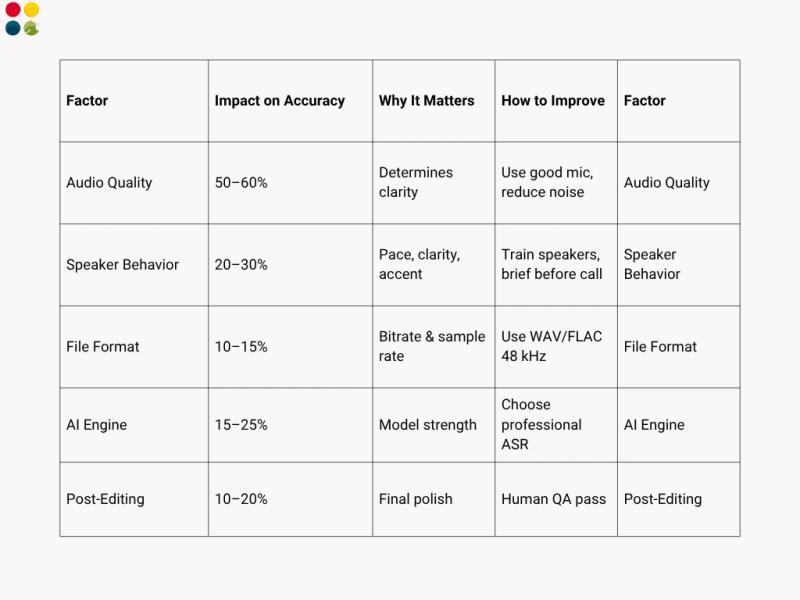
What Affects Transcription Accuracy the Most?
Advanced Techniques (Pro Tips)
1. Use domain vocabulary lists
Upload custom words like: brand names, product SKUs, medical terms, region-specific names.
2. Use timestamps for analysis
Great for training, meetings, audit trails.
3. Eliminate overtalk
AI struggles when people speak simultaneously.
4. Feed better audio to get better AI
Garbage in = garbage out.
Great input = near-perfect output.
Thoughts to Ponder
● How much time does your team lose manually typing?
● How many customer insights get missed without accurate transcripts?
● Are your decisions backed by real conversations or guesswork?
● What would 99% accuracy unlock for your business — training, quality, compliance, product insights?
If your business runs on conversations, transcription isn’t a utility.
It’s an intelligence layer.
Key Takeaways
● Perfect Voice File to Text Converter is a process, not a tool
● Audio quality impacts accuracy more than anything else
● Custom vocabulary models drastically reduce errors
● Hybrid (AI + human) approach delivers near-perfect results
● Preparing your audio boosts accuracy without extra cost
● Choose formats and workflows aligned with your industry needs
Conclusion
It is completely within the realm of possibility to achieve perfect voice-to-text transcription-but only if your system, audio, tool, and workflow blend together perfectly. Be it running a contact center, auditing customer calls, documenting sales conversations, or capturing interviews, with the right setup, results can consistently reach 98-99% accuracy.
In a world where every conversation holds value, transcription isn’t just record-keeping — it’s a competitive advantage.
Wrap Up
If you have inaccurate transcripts, inconsistent formats, or were using unreliable tools, then this is not your fault. You just need a structured approach- and the right platform.
DialDesk’s AI-powered transcription suite helps brands achieve:
● Real-time transcription
● Near-human accuracy
● Emotion + silence detection
● Multi-language support
● Auto QA scoring
● Analytics dashboard
Want to Transcribe Voice to Text with 98%+ accuracy?
Book a demo with DialDesk’s Voice AI Engine today → www.dialdesk.in