OVERVIEW
● WhatsApp links more than 2.9 billion individuals per month in personal, business, and enterprise conversations. However, when issues arise — account lockouts, verification problems, or unexpected bans — most users are unaware of how to contact WhatsApp Support directly.
● This handbook is your one-stop guide to know how, when, and where to reach WhatsApp Support anytime, on any device and platform — from standard WhatsApp to WhatsApp Business and WhatsApp Web.
● We’ll also discuss response times, best practice, and alternatives in case you don’t receive speedy assistance.
Introduction
Support shouldn’t be mysterious — particularly for an app that most people on your contact list use. But “How do I get in touch with WhatsApp Support?” is still one of the most sought-after questions globally.
Whether you’re a business owner depending on WhatsApp for customer interactions or a regular user shut out of your own account, support on time can be the difference between minutes of anguish and days of hindrance.
The reality is, Contact WhatsApp Support isn’t a one-size-fits-all affair. Various users (personal, business, or enterprise) have various pathways to the proper help desk. But if you simply know where to go — and what to tell them — you can bypass the automated messages and have your problem solved more quickly.
This blog takes you through it all — step-by-step, region-specific, and time-efficient — so you never need to Google “WhatsApp contact number” again.
Quick Ways to Contact WhatsApp Support (2025 Edition)
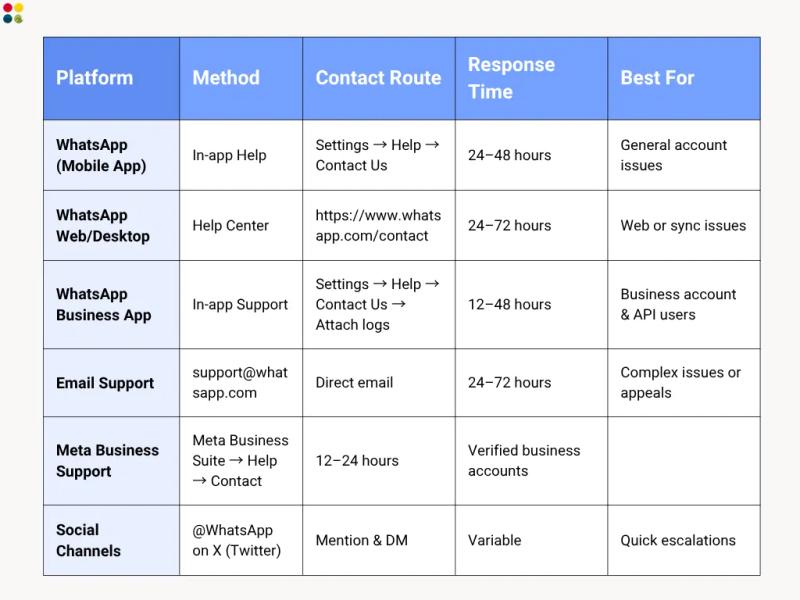
1. Contacting WhatsApp Support via Mobile App
Step-by-Step Guide:
● Open WhatsApp → Settings → Help → Contact Us
● Describe your issue clearly (add screenshots if needed)
● Tap Next → Send Email
● You’ll receive a support confirmation email from support@whatsapp.com
Pro Tip: Include your country code, phone number, and device type in the message. It assists them in solving your issue sooner.
2. How to Contact WhatsApp Support on Web or Desktop
If you use WhatsApp Web or Desktop, go to the official contact form at:
https://www.whatsapp.com/contact
Fill in:
● Your full name
● Phone number (with country code)
● Platform (Web/Desktop)
● Brief description of the issue
You’ll get a response through email within 2–3 working days.
3. For WhatsApp Business Users
For small and medium businesses, support is more structured:
● Open Business App → Settings → Help → Contact Us
● Choose “This issue is affecting my business”
● Attach your chat logs if needed
If you’re using the WhatsApp Business API, head to the Meta Business Help Center and log in with your Business Manager ID.
Stat Insight: As Meta (2025) reports, more than 200 million companies utilize WhatsApp Business worldwide — and responsive support becomes a key for CX success.
4. Contact via Email Support
You can email support@whatsapp.com or business-support@whatsapp.com (for Business).
Email Format Example:
Subject: Unable to Verify WhatsApp Number +91XXXXXX
Hi WhatsApp Team,
I’m facing an issue verifying my number on WhatsApp. My details are below:
– Phone Number: +91XXXXXX
– Device: iPhone 14 / Android 13
– Issue Summary:
Please assist.
Thanks,
[Your Name]
Expected reply: Within 1–3 days.
5. Meta Business Support (for Verified Business Accounts)
If you run your WhatsApp Business through Meta Business Suite, you can:
● Go to Help → WhatsApp Support Contact
● Select WhatsApp as the product
● Chat with a Meta representative directly
Pro Tip: Verified business accounts get high-priority support, particularly for payment or API-related issues.
6. Alternative: Social Media Escalation
You can also contact @WhatsApp on X (Twitter) or Facebook. Although these media don’t fix technical issues, they can assist in getting unresolved tickets escalated more quickly.
Thoughts to Ponder
● Did you know that WhatsApp receives more than 100 billion messages every day — but their support system resolves millions of tickets every week?
● It’s common for most users to bypass the in-app path and use arbitrary contact numbers — which tend to be scams.
● Always confirm communication only through official domains such as @whatsapp.com or @support.whatsapp.com.
Key Takeaways
● Always reach out to WhatsApp through in-app Help or official website.
● Avoid any “WhatsApp helpline numbers” online — they’re unofficial.
● Business users receive priority support via Meta Business Suite.
● Include all applicable info (phone, OS, logs) to prevent delays.
● Follow up on your ticket ID — support requests are time-stamped.
Wrap-Up
Whether you’re encountering an unexpected ban, a sync failure on messages, or simply wish to report a bug, knowing which channels to reach WhatsApp Support avoids frustration and downtime.
The platform is not instant Chat Support like in some SaaS applications, but when you use the correct channel, responses are prompt and problem-oriented.
Tip: the sooner you explain your issue clearly, the quicker you will be assisted.
Conclusion
In a life where WhatsApp is your lifeline — for work, sales, or love — being cut off even temporarily can feel disorienting. Knowing how to contact WhatsApp Support at any time isn’t merely technical know-how; it’s a digital survival skill.
Stay aware, stay vigilant, and always fall back on official channels.Need Smart, Human CX Support for Your Business?
At DialDesk, we assist companies in creating customer support systems that answer quicker, solve better, and retain longer — on WhatsApp, calls, or chatbots.
Make every question turn into customer trust.
Go to DialDesk.in and book a demo now!